
Grow your business with reviews and repuation managment
Start ranking higher on google, get more leads and start getting chosen above your competion
"93% of customers read online reviews before contacting a business"

Our Process
Your business deserves more reviews. You put in the effort and deliver great work every day. Now it’s time for everyone else to see it too.
Understand
Review management is all about making sure your business gets more good reviews and stays looking great online. It means reminding happy customers to leave feedback, keeping an eye on what people are saying, and replying in a friendly way. When you do this properly, it helps you show up higher on Google, look more trustworthy, and win more jobs. It’s a simple way to turn good work into more customers.
Implement
Google reviews are vital because businesses with more positive reviews and higher ratings are far more likely to rank in the top Google results, and studies show that over 90% of customers read online reviews before choosing a local service, meaning strong reviews directly lead to more calls, enquiries, and sales
Explore Features
Make business easier and lose the stress
NO TIME
As a business owner, you don’t have time to chase customers for reviews. You’re already doing enough.
DONT LOSE LEADS
Customers aren’t finding you online, even though you do great work. Don’t let competitors take your revenue simply because they show up first.

Running a business is busy enough. Let us manage and reply to your reviews for you, so you don’t have to worry about it.

Get reviews flowing within a week of your free trial
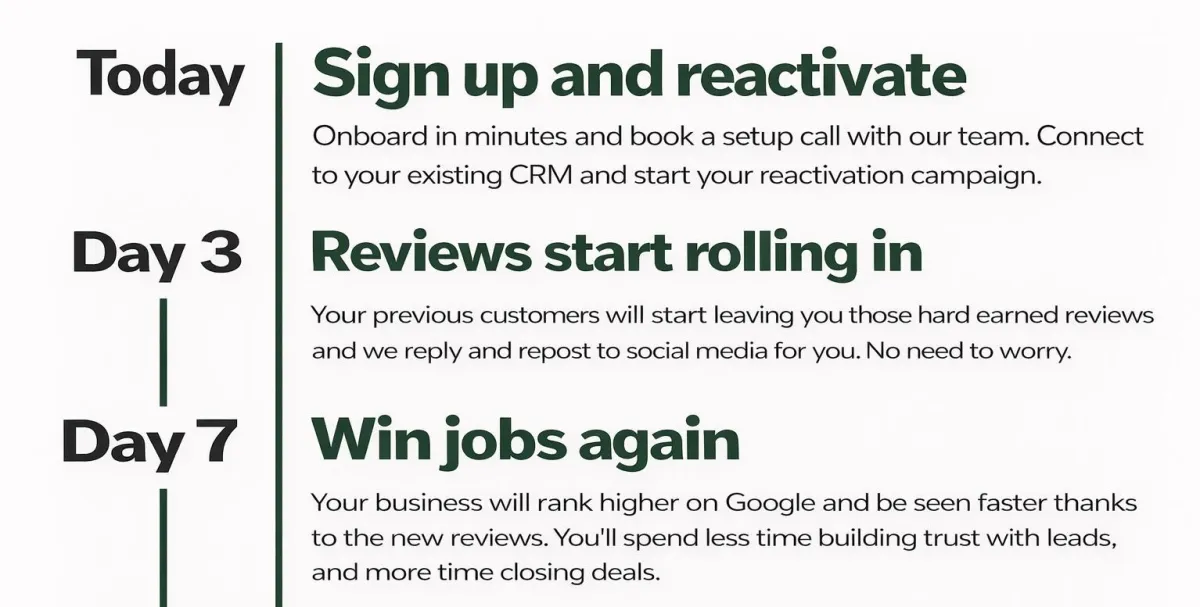
What to expect in your review reactivation
Our review reactivation campaigns typically generate 10–100+ new reviews in weeks.
We text your past customers with a simple request, achieving 10%–30% response rates.
More reviews mean higher Google rankings, stronger trust, and more enquiries.
While competitors fall behind, you move ahead.
It’s the fastest, most affordable way to get noticed and grow revenue.
We Handle Everything. You Grow.
Instant setup
• Done-for-you
• Review boost
• Expert replies
• Auto posting
• Google lift
• Call surge
• Peace of mind
• Scale faster
Stop Competing on Price
When your reviews are strong, customers stop asking “How much?” and start asking “When can you start?”
No risk, no obligation. Get our full review reactivation system working for you, even if you choose not to continue — so you can experience real results first.
Rank higher with us
#1
More reviews means more trust
Studies consistently show:
⭐⭐⭐⭐⭐ = Most clicks
⭐⭐⭐⭐☆ = Still good
⭐⭐⭐ or less = People skip you
On average:
👉 A business with 4.5+ stars gets 2–3x more clicks than one under 4 stars.
#2
No need to spend thousands on ads
People Trust Reviews More Than Ads
Surveys show:
9 out of 10 people read reviews before choosing a business
84% trust reviews as much as personal recommendations
So reviews = digital word-of-mouth.
#3
Position Yourself as the Premium Choice
More Reviews = Less Price Shopping
Strong reviews mean:
Fewer “how much?” calls
Clients with strong reputations charge more and win more.
Get started today
Fill in the form and start your free
RISK FREE 14 DAY TRIAL
0121 123 4567
About
© {2026 Ai for businesses - All Rights Reserved.